Feb 5, 2026
As AI agents become central to enterprise operations, organizations face a critical challenge: how do you manage dozens or hundreds of agents without descending into chaos? How do you prevent untested changes from reaching production? How do you track who changed what and when?
The answer lies in adapting proven software development practices to the unique world of AI agents. Enter the Agentic Development Life Cycle (ADLC).
What Is the Agentic Development Life Cycle?
The Agentic Development Life Cycle (ADLC) is a framework that applies software development lifecycle (SDLC) principles to building, testing, and deploying AI agents. Just as modern software teams use version control, staging environments, and code review processes, AI teams need similar governance for their agents.
Unlike traditional applications, AI agents combine natural language processing, dynamic workflows, and multiple system integrations. This complexity makes governance and quality control even more critical. A single untested prompt change can affect thousands of customer interactions. A misconfigured integration can expose sensitive data.
ADLC solves these challenges through three integrated layers: Environments, Version Control, and Approval Workflows.
Why AI Agent Management Needs ADLC
Before we dive into how ADLC works, let's understand why it's essential for scaling AI operations.
The Problems ADLC Solves
Unauthorized changes reaching production. Without proper controls, any team member can modify a live agent and immediately impact users. This creates risk and makes troubleshooting nearly impossible.
No audit trail. When something breaks, teams waste hours trying to figure out what changed. Was it a prompt modification? A new integration? A configuration update? Without version history, you're flying blind.
Testing in production. Many organizations build and test agents directly in production environments because they lack proper staging infrastructure. This means users become unwitting beta testers.
Collaboration chaos. When multiple builders work on the same agents without coordination, changes conflict and override each other. The result is wasted effort and broken workflows.
Compliance nightmares. Regulated industries need to prove who approved what changes and when. Without proper governance, audits become painful and expensive.
These aren't theoretical problems. They're the reality for every organization scaling beyond their first few AI agents.
Layer 1: Environment Management for AI Agents
The foundation of ADLC is environment separation. Software teams learned decades ago that you don't test in production. The same principle applies to AI agents.
How StackAI Environments Work
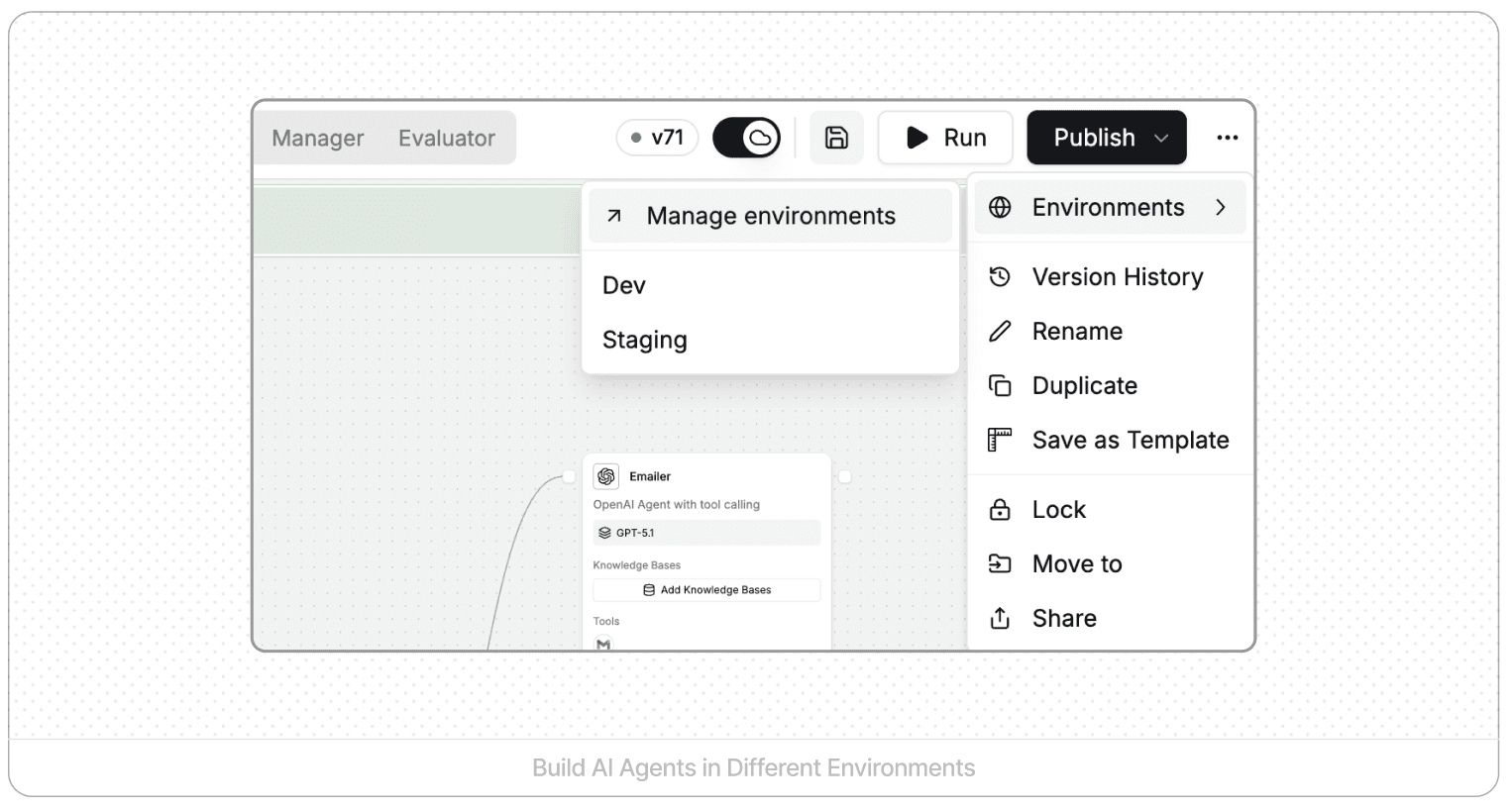
Every StackAI workspace includes three environments by default: development, staging, and production. Each environment is completely isolated.
Development is where builders create and experiment. You can modify prompts, add nodes, change logic, and test with dummy data without any risk to live systems. Nothing you build here affects real users until you explicitly publish to another environment.
Staging mirrors production but with test data. This is where you validate that agents work correctly with production-like configurations before exposing them to users.
Production is your live environment where approved agents serve real users and connect to production systems.
Changes in development don't affect staging or production. Each environment can connect to different data sources and APIs. You can see at a glance which version is running in which environment.
Custom Environments for Specific Needs
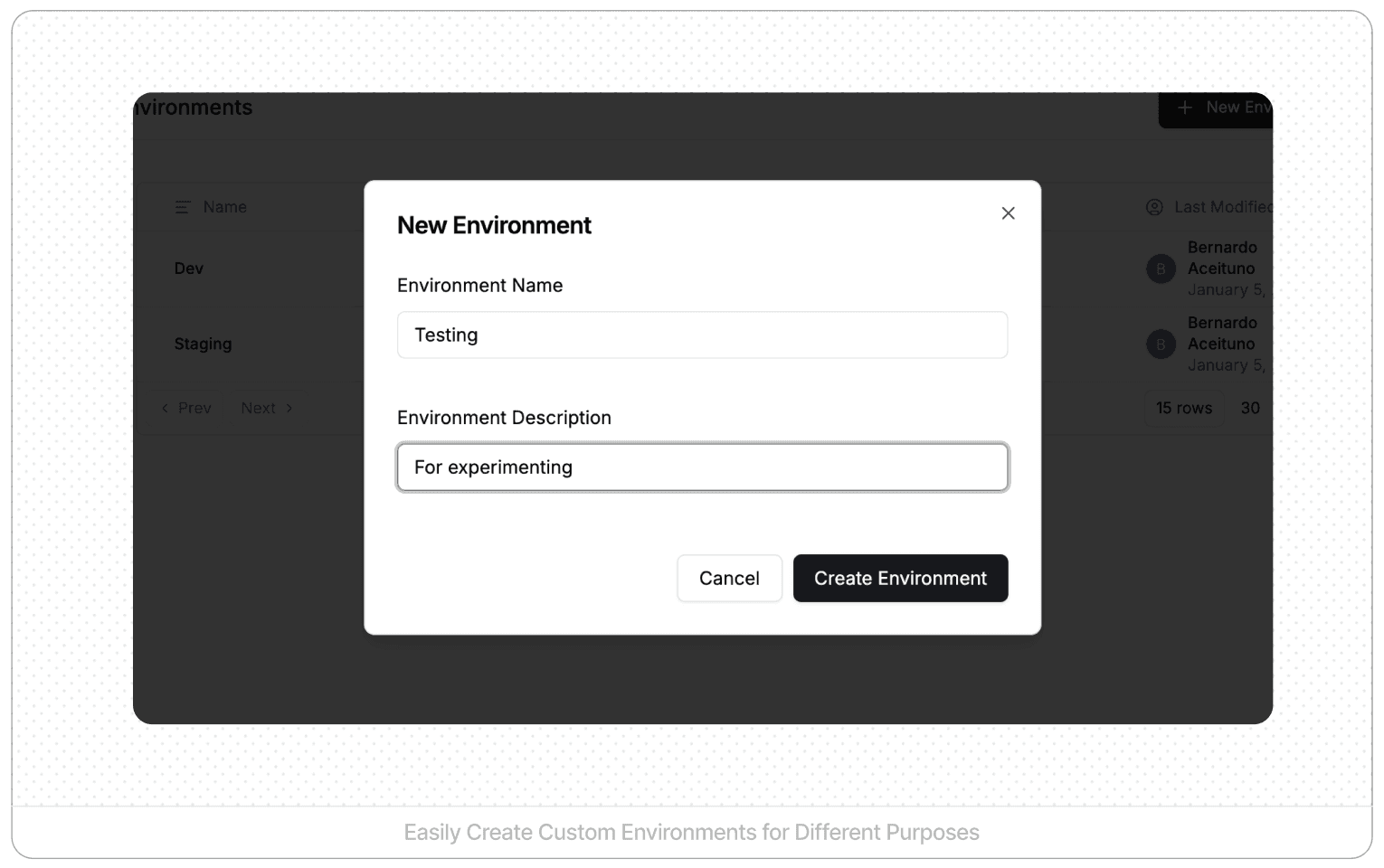
Beyond the default three, organizations can create additional environments tailored to their workflow:
A testing environment for dedicated QA teams running systematic test suites. An experimentation environment for trying radical new approaches without cluttering development. A demo environment with curated data for sales and training. Client-specific environments for multi-tenant deployments where different customers need isolation.
This flexibility allows teams to structure their development process around their actual needs rather than forcing everyone into a one-size-fits-all approach.
Why Environment Separation Matters
Environment separation isn't just about safety. It's about velocity. When builders know they can experiment freely in development without breaking production, they move faster. When QA teams have a dedicated staging environment, they can validate thoroughly without blocking development. When production is protected by governance, everyone sleeps better.
Layer 2: Version Control for AI Agents
Every change to an agent creates a new version in StackAI. This automatic versioning creates a complete audit trail from the moment an agent is created until it's eventually retired.
Automatic Change Tracking
You don't need to remember to commit changes or write commit messages. Every save creates a version. Every version captures the complete state of your agent at that moment. The version history shows what changed, when, and by whom.
This automatic approach eliminates the compliance gap that exists when version control is optional. There's no way to make an untracked change.
Understanding What Changed with Diffs
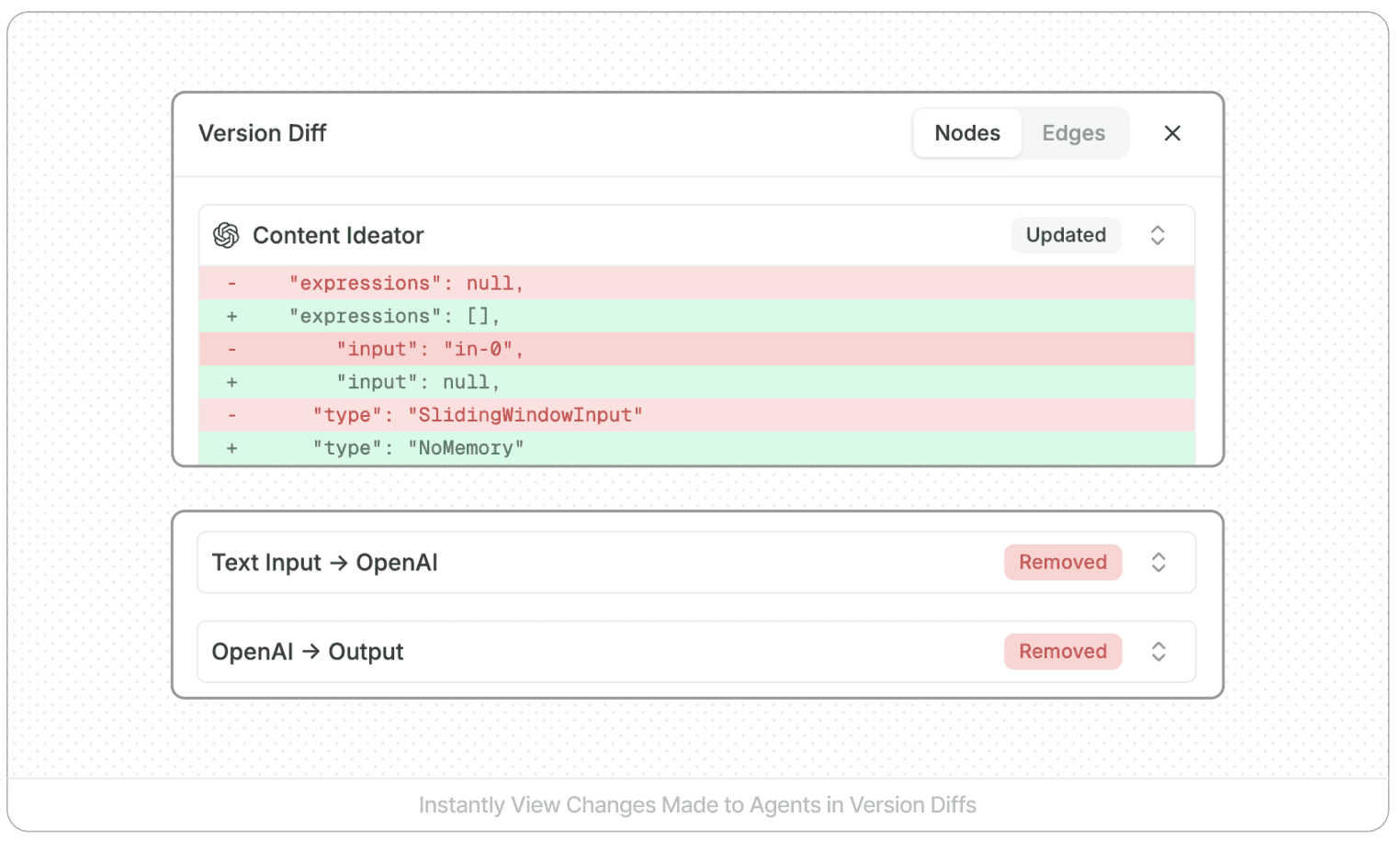
The real power of version control emerges when you need to understand what actually changed between versions. StackAI's comparison tool shows detailed diffs that reveal:
Nodes that were added or removed. Changes to prompts or LLM configurations. Modified connections between nodes. Integration changes. Updated data sources.
Imagine an agent that worked perfectly yesterday suddenly produces strange outputs today. Instead of guessing, you compare today's version with yesterday's. The diff immediately shows that someone modified a critical prompt or adjusted an LLM temperature setting. What could have been hours of debugging becomes a two-minute fix.
Safe Experimentation with Rollback
Version control creates a safety net. When a change doesn't work out, you can revert to any previous version. The revert process creates a new version while restoring the agent to a previous state, maintaining the complete history.
This capability transforms how teams approach innovation. Builders can try ambitious changes knowing they can always roll back if things go wrong. The fear of breaking things dissipates when recovery is one click away.
Preventing Unauthorized Changes with Agent Locking
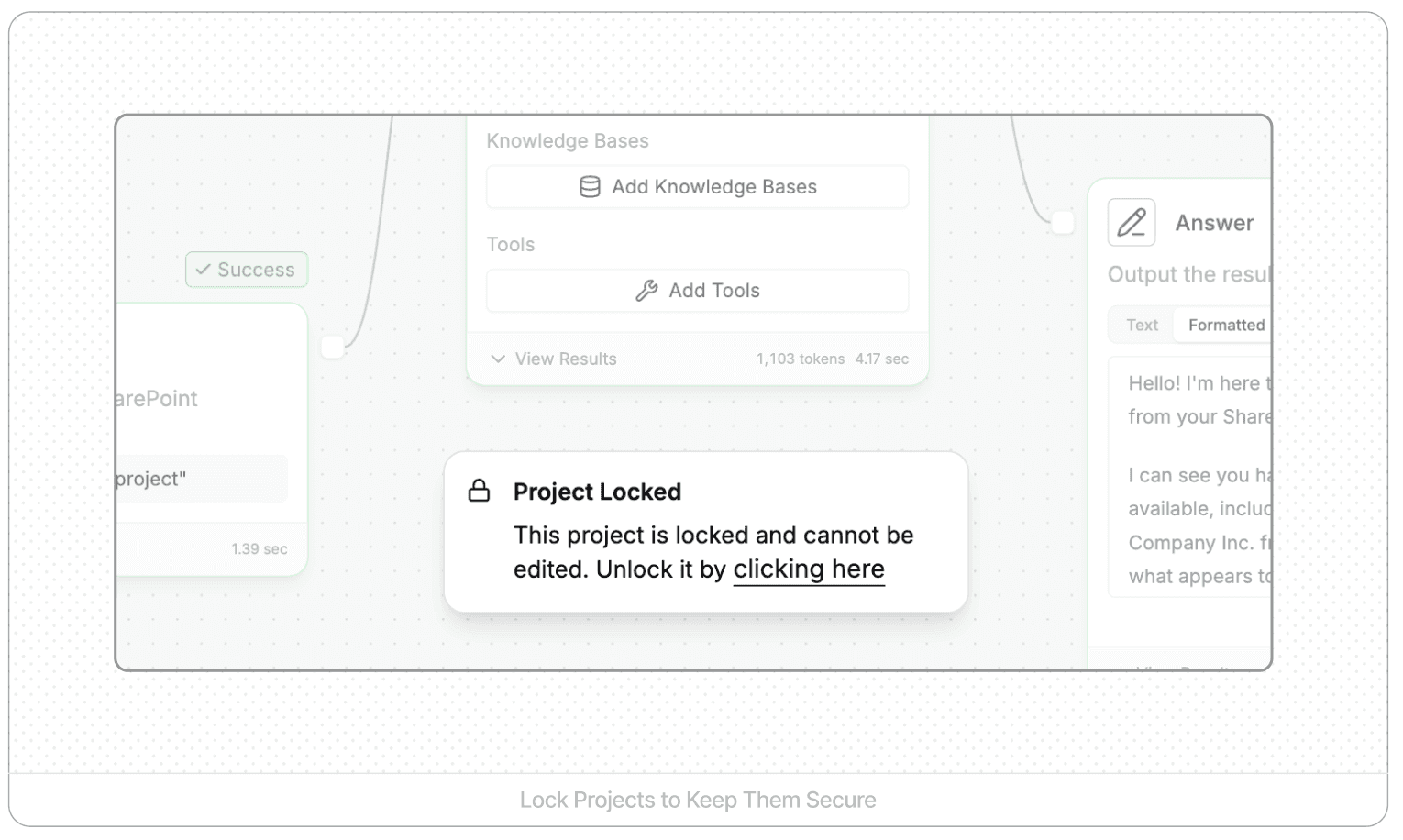
For critical agents or situations requiring strict change control, StackAI provides agent locking. When you lock an agent, only the creator can make changes. Other team members can view but not edit.
This is particularly valuable for production agents that are stable and working well, agents undergoing compliance or legal review, situations where a single person needs to coordinate all changes, and critical workflows where unauthorized modifications could cause significant business impact.
Agent locking integrates with StackAI's broader governance capabilities, giving organizations fine-grained control over who can modify what.
Layer 3: Approval Workflows with Pull Requests
Version control tells you what changed. Approval workflows control when those changes reach production. This is where ADLC prevents the "cowboy coding" problem of builders shipping directly to production without review.
Enabling Pull Request Requirements
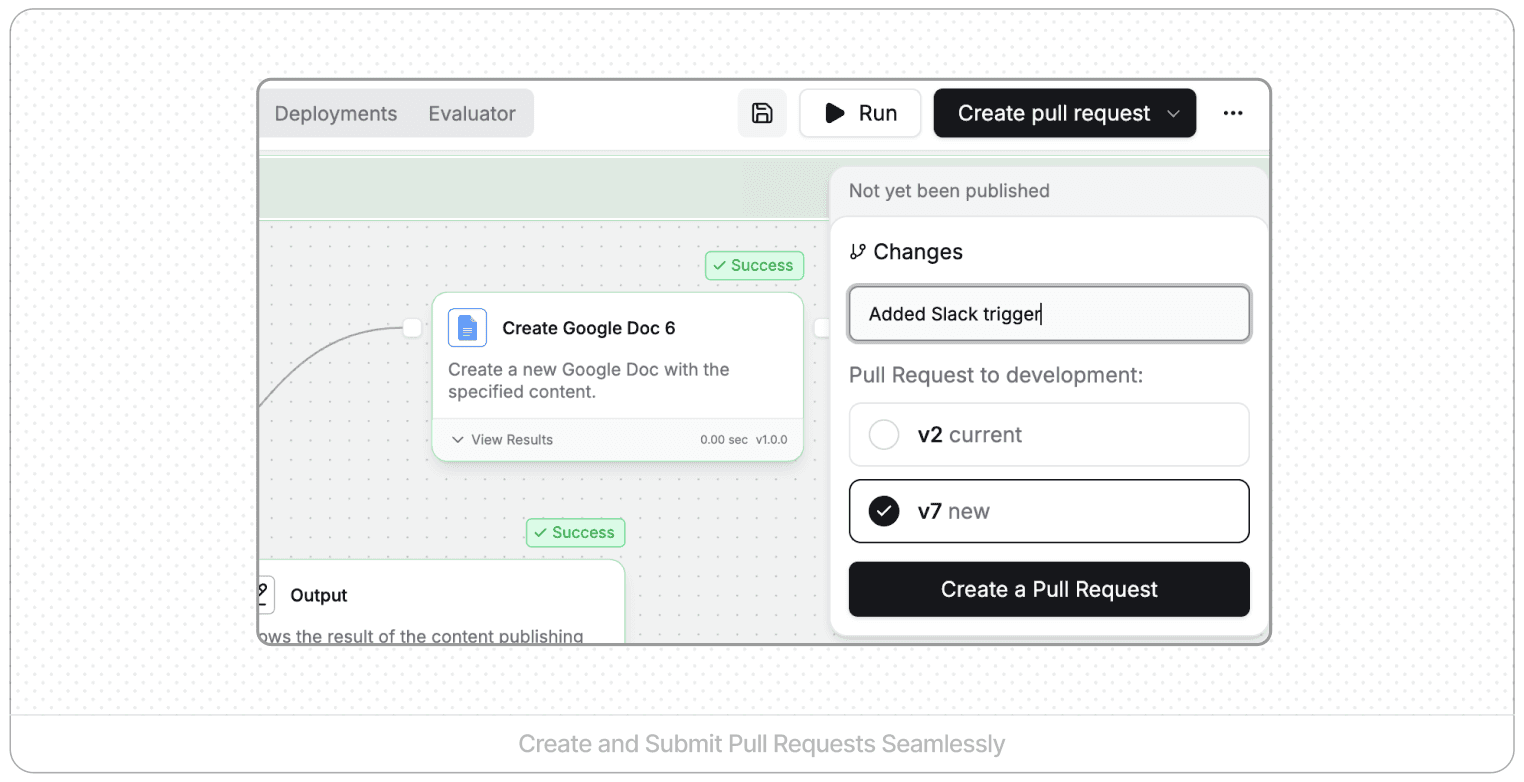
Organizations can enable publish requirements at the workspace level through a feature flag. Once enabled, builders cannot publish agents directly to production. They must create pull requests that require admin approval.
This fundamentally changes the development workflow in a positive way. Builders maintain freedom to edit agents in development, save work frequently, and test thoroughly. But they cannot push changes to staging or production without approval. Only designated admins can approve pull requests and trigger deployments.
The Pull Request Workflow in Practice
Here's a concrete example. A builder wants to add a knowledge base node for improved retrieval. They:
Build the change in the development environment
Configure the knowledge base node
Test with the canvas runner to verify functionality
Save the agent (creating a new version)
Click "Create Pull Request" instead of "Publish"
Provide a descriptive name and explanation: "Add KB retrieval for customer FAQs"
Submit the pull request
At this point, the changes exist in version control and are saved, but they're not published to any environment accessible to users or systems.
Admin Review and Approval
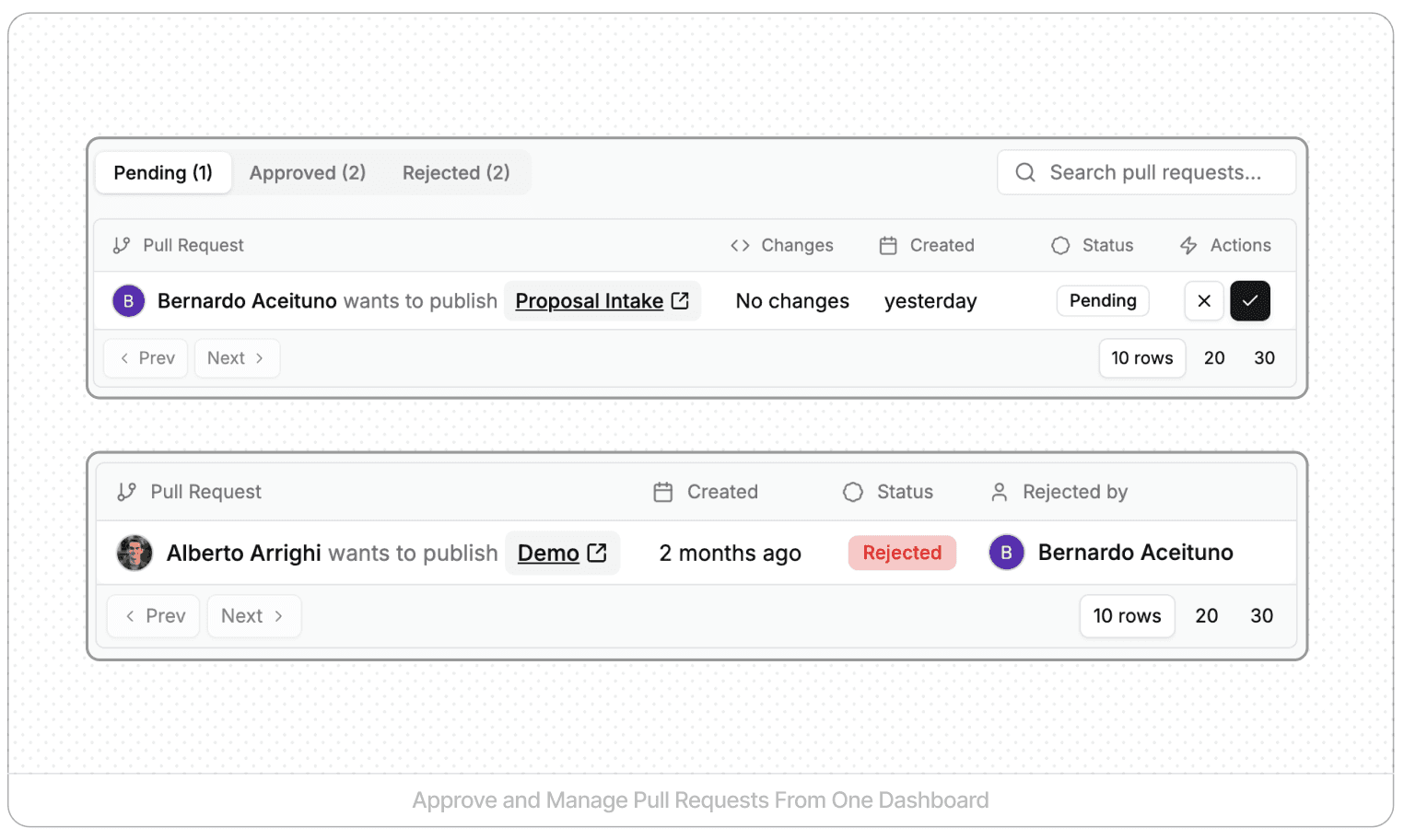
Admins see all pending pull requests in a central queue. For each request, they can:
Review the description of what changed and why. Examine the version diff showing exactly what was modified. Test the changes themselves if needed. Approve the changes or request modifications. Add comments and feedback.
When an admin approves a pull request, StackAI automatically publishes the changes to the designated environment. The deployment history records which pull request triggered the deployment, who approved it, when it was deployed, and what environment received it.
Multi-Stage Deployments
Pull requests can target specific environments, enabling staged rollouts. A builder might:
Create a pull request to deploy to development for team testing
After team approval, create another pull request to deploy to staging
After staging validation, create a final pull request to deploy to production
Each step requires its own approval, creating multiple checkpoints before changes reach end users. This mirrors traditional software deployment pipelines, giving organizations the same safety they expect from other critical systems.
Complete Development Visibility
The combination of version control and pull requests creates a complete development narrative. For any agent, you can see:
Every version that was created. Which changes were bundled into which pull requests. Who requested each deployment. Who approved it. When it was deployed and to which environment. What the current status of each environment is.
This transparency is essential for compliance audits, troubleshooting production issues, and knowledge transfer when team members change roles.
Implementing ADLC in Your Organization
The technical capabilities exist in the platform. The challenge is organizational adoption. Here's how to implement ADLC effectively.
1. Establish Environment Discipline
Train everyone on environment boundaries from day one. Development is for building and experimenting. Staging is for validation with production-like data. Production is sacred and receives only approved, tested changes.
Make it standard practice to build in development, never directly in production. This might feel like friction initially, but it quickly becomes second nature.
2. Enable Approval Requirements Strategically
Don't enable pull request requirements for everyone immediately. Start with:
Critical production agents that many users depend on. Agents handling sensitive data or compliance-critical workflows. Teams large enough that coordination overhead justifies formal approvals.
Smaller teams or experimental projects may not need this governance level initially. You can always tighten controls as projects mature.
3. Designate Qualified Approvers
Identify who has admin rights to approve pull requests. These people need:
Technical understanding to review version diffs meaningfully. Authority to make deployment decisions. Availability to avoid becoming bottlenecks.
Consider having multiple admins to distribute the approval workload and ensure requests don't languish during vacations or busy periods.
4. Document Your ADLC Standards
Write down your organization's specific ADLC workflow:
Which environments are used for what purposes. What testing is required before each environment. Who can approve deployments to which environments. What should be included in pull request descriptions. How to handle urgent fixes versus planned enhancements.
This documentation transforms StackAI's technical capabilities into an organizational standard that survives team changes.
5. Use Version Control Actively
Don't just let versions accumulate passively. Actively leverage version control:
Compare versions while building to evaluate whether recent changes improved performance. Review diffs before creating pull requests to verify exactly what you're deploying. Check version history when troubleshooting to identify when issues first appeared. Use version comparison during onboarding to show new team members how agents evolved.
Version control becomes exponentially more valuable when teams use it proactively rather than just retrospectively.
6. Lock Agents Strategically
Not every agent needs to be locked, but consider locking:
Production agents that are stable and working well. Agents undergoing security or compliance review. Mission-critical workflows where even small changes could cause significant problems.
Unlock them when coordinated changes are needed, then re-lock after deployment. This balance maintains both governance and agility.
Real-World ADLC Benefits
Organizations implementing ADLC with StackAI report tangible benefits:
Faster innovation because builders can experiment fearlessly in development knowing production is protected.
Reduced incidents because changes go through review and staging validation before reaching users.
Easier compliance because every change is tracked with clear approval chains.
Better collaboration because teams can see what everyone is working on and coordinate effectively.
Improved troubleshooting because version history makes it easy to identify when and why issues appeared.
Smoother onboarding because new team members can review version history to understand how agents work.
These aren't soft benefits. They translate directly to faster time-to-value, lower operational risk, and reduced overhead.
The Future of AI Agent Management
As AI agents become more sophisticated and organizations deploy them more widely, the need for robust governance only grows. ADLC provides the foundation for scaling AI operations from a handful of experimental agents to hundreds or thousands of production agents.
The principles are the same ones software engineering teams have relied on for decades: environment separation, version control, and approval workflows. But the application to AI agents is relatively new. Organizations that implement ADLC now gain a significant advantage in their ability to deploy AI safely and at scale.
Getting Started with ADLC
If you're already using StackAI, ADLC capabilities are built into the platform. Start by:
Establishing clear environment discipline with your team
Enabling version control best practices
Considering whether pull request requirements make sense for your critical agents
Documenting your ADLC standards
If you're evaluating platforms for AI agent development, ask vendors how they handle environment management, version control, and approval workflows. These capabilities separate enterprise-ready platforms from tools designed for individual experimentation.
Conclusion: Make AI Agent Development Scalable
Without ADLC, agent development becomes chaotic as teams grow. Builders step on each other's changes. Untested modifications reach production. Nobody knows which version is running where or who approved what.
StackAI's ADLC capabilities (environments, version control, and approval workflows) prevent this chaos. They bring the same discipline to agent development that software engineering teams have relied on for decades.
This isn't theoretical. It's concrete features you use every day: working in development and publishing to staging, comparing version diffs to see what changed, creating pull requests that admins approve before production deployment, tracking deployment history to understand what's running where.
This is how organizations build dozens or hundreds of agents while maintaining quality, security, and governance. It's how you scale from experimental AI projects to production systems that your business truly depends on.
The tools exist in the platform. The question is whether your organization will use them intentionally and systematically, or learn these lessons the hard way.
Ready to implement ADLC for your AI agents? Get a demo to learn how StackAI can help you scale AI development with enterprise-grade governance.
Related Resources:

Divesh Punjabi
Product Manager at StackAI










